In response to a query yesterday from a friend of mine who was finding it a bit frustrating to look for books at Google Books, I thought I would share here some of the ways that I find books at Google Books.
1. Searching for text strings. Since I am usually collecting proverbs and fables and short poems, I find it very productive to search for text strings. To search on a string, just put quotation marks around the string. When I find an unusual proverb, for example, I search for a few words at Google Books, and often find some amazing books that also contain the proverb. Here's an example: "magna nocet, medicina docet" (the full saying: Cena brevis, vel cena levis, fit rara molesta; / Magna nocet, medicina docet, res est manifesta). When searching for text strings it is important to avoid word initial i/j and u/v ambiguities, along with other characters that are variable in Latin orthography and/or characters which cause special trouble for optical character recognition software. For example, the "ae" diphthong was often printed with æ, which the usual OCR software cannot read. So, avoid those ambiguities in your search terms.
2. Searching for title words. Although Google Books has an interface where you can do advanced searches, it's usually easier just to do this on your own. For example, to search on a word or phrase in the title of a book, just add intitle:word or intitle:"word phrase" to your search parameters. Remember that Google does not compensate for Latin morphology, so if you are looking for emblem books, you might do separate searches for the various forms of emblem you might find in a Latin book title: emblemata, emblematibus, emblematum, emblematica, emblematicis, etc.
3. Searching for author names. Just like intitle:term, you can add inauthor:name to your search. Remember that Latin authors are sometimes cataloged under their Latin name and sometimes under their name in their native language, e.g. Rollenhagen v. Rollenhagius. Also, Google Books conveniently turns the author's name in the "About This Book" page into an active link, so you can just click on the author's name in blue to get a search based on the author's name.
4. Filter your search for just free Google Books. Unless you want to torture yourself with search results that will not lead you to an actual online book (I am constantly tortured, for example, by references to Samuel Singer's Thesaurus proverbiorum medii aevi... SIGH: just $250 per volume), then you can limit your search to just free books by selecting the "Free Google eBooks" filter option in the left-hand column.
5. Save books to your Google Books Library. I'm not super-happy with how the Google Books Library Bookshelves work (I want my old tags back...) - but it is really useful to save books to one of your Google Bookshelves, any shelf at all. That way, if/when the book shows up again in your search results, you'll know that this is a book you have already saved because it will display as already being "in your library."
6. Save books to Zotero also. Since the Google Books Library Bookshelves are so frustrating to work with, I also save my Google Books to Zotero. Google Books is one of the sites that Zotero responds to really nicely, so if you install Zotero for your browser, you will see a little Zotero icon in the browser bar allowing you to save the Google Book to Zotero. Since I can update and correct the bibliographical errors in the Google Book listings (sadly, there are lots of errors), Zotero is incredibly useful for me in managing my Google Books Library.
7. Multivolume works. In my experience, the single biggest problem I have at Google Books is the way multivolume works are handled. At least in Latin, Google Books does not seem to understand multivolume works because of the way the different volumes are referred to in Latin on the title page. Here's a good trick: if you are looking for a given volume in a multivolume work, try checking the "More Editions" option - often Google Books considers those different volumes just as more editions of the same work. Not good at all, but maybe that is something that Google Books will start letting us curate in the future; all that machine intelligence could use with a good dose of human intelligence, too! :-)
Finally, the best advice I can give for enjoying Google Books is to approach it with a sense of adventure. Yes, in some ways the Latin works at Google Books really are a big mess... but a mess that is positively full of absolutely amazing delights! If anyone else is keeping track of Google Book discoveries, esp. of Latin or other Classics-related books, in the form of a blog like this one, let me know so I can add it to my blog roll.
Showing posts with label Admin. Show all posts
Showing posts with label Admin. Show all posts
Tuesday, January 3, 2012


Saturday, December 11, 2010
GoogleBooks PDF and GoodReader
I thought I would post some notes here about how I use the books at GoogleBooks - my approach is to download them as PDF files to my computer and/or to my iPad and then annotate the PDFs as I read them. It works out great for me, and it is all free - except for the 99 cents I spent on the GoodReader app for my iPad. I love working with the books this way - here's a step by step of just how I do that on the iPad. I need to be online to do the downloading, but then I can read the books offline, no need for any kind of Internet connection.
Download PDFs using GoodReader. GoodReader is the app I use the most on my iPad. There are lots of ways to get PDFs onto the iPad, but the way I usually do that is by downloading PDF files directly from the GoogleBooks website. So, to add books to my iPad library, I open the GoodReader app and then go to the Web Downloads panel. I choose Browse Web, and I browse until I get to the book view page at Google Books, where there is a PDF link - when I reach this link, I don't follow the link - I download the file! I also have PDF links here in the posts at this blog to make it easy to find and download the actual GoogleBook to my iPad.
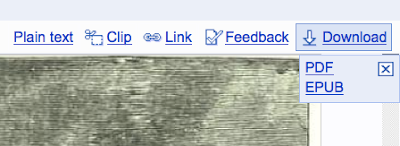
After the PDF file downloads to GoodReader, I usually rename the file and put it in one of the folders I've created at GoodReader to save my hundreds of PDFs. The file management options in GoodReader are really excellent. I am able to keep hundreds of PDFs nicely organized there.
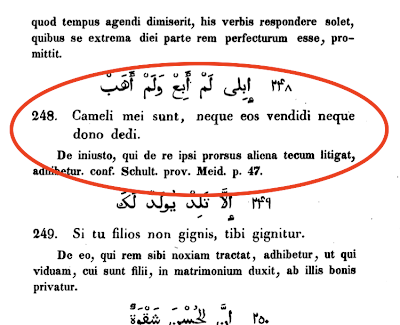
Read and annotate the PDF. It is such a pleasure to read these books on the iPad (here's a tip: make sure you enable to page cache setting in GoodReader, so that you will not have to wait in-between pages as you page through a super-gigantic PDF file). Whenever I want to annotate something, I can leave a bookmark, or circle it with a big red circle, or leave a note. It's so easy - I just touch the screen and choose what kind of annotation I want to make! Here are two screenshots that show how it looks. The red circle is perfect for marking proverbs I want to grab and put into my database:
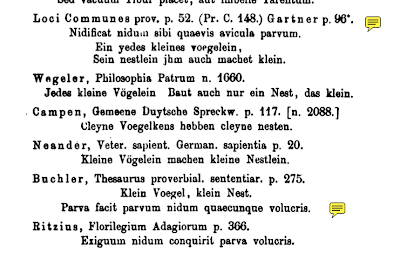
Here are the little yellow "stickies" that get left behind where I leave a note to myself (I click on the stickies to read the note, but often I leave just a blank note since the little stickies themselves are a nice kind of marker to leave behind):
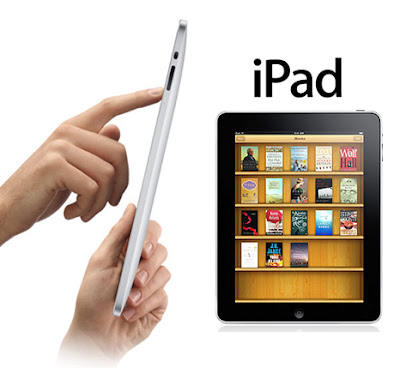
 After I've finished reading a book, then I prop the iPad on my study desk and start transcribing the proverbs and fables that I've found into the database on my desktop computer. What a great way to work!

If you have any tips on reading and using GoogleBooks, feel free to leave a comment at this blog post!
.
Download PDFs using GoodReader. GoodReader is the app I use the most on my iPad. There are lots of ways to get PDFs onto the iPad, but the way I usually do that is by downloading PDF files directly from the GoogleBooks website. So, to add books to my iPad library, I open the GoodReader app and then go to the Web Downloads panel. I choose Browse Web, and I browse until I get to the book view page at Google Books, where there is a PDF link - when I reach this link, I don't follow the link - I download the file! I also have PDF links here in the posts at this blog to make it easy to find and download the actual GoogleBook to my iPad.

After the PDF file downloads to GoodReader, I usually rename the file and put it in one of the folders I've created at GoodReader to save my hundreds of PDFs. The file management options in GoodReader are really excellent. I am able to keep hundreds of PDFs nicely organized there.
Read and annotate the PDF. It is such a pleasure to read these books on the iPad (here's a tip: make sure you enable to page cache setting in GoodReader, so that you will not have to wait in-between pages as you page through a super-gigantic PDF file). Whenever I want to annotate something, I can leave a bookmark, or circle it with a big red circle, or leave a note. It's so easy - I just touch the screen and choose what kind of annotation I want to make! Here are two screenshots that show how it looks. The red circle is perfect for marking proverbs I want to grab and put into my database:

Here are the little yellow "stickies" that get left behind where I leave a note to myself (I click on the stickies to read the note, but often I leave just a blank note since the little stickies themselves are a nice kind of marker to leave behind):
 After I've finished reading a book, then I prop the iPad on my study desk and start transcribing the proverbs and fables that I've found into the database on my desktop computer. What a great way to work!


If you have any tips on reading and using GoogleBooks, feel free to leave a comment at this blog post!
.
Thursday, December 9, 2010
Bibliography: Latin Proverbs
Here are the books with Latin Proverbs that I have found at GoogleBooks, listed here by title; I'll be expanding on these items with real bibliographical entries as I work through the books.
GoogleBooks: Adagia: i. e. : Proverbiorum, paroemiarum et parabolarum omnium by (many authors). 1629.
GoogleBooks: Adagia ex celeberrimis scriptoribus tam latinis, quàm polonicis by Arnold Kazimierz Zeglicki. 1751.
GoogleBooks: Adagia quaedam ac carmina magis obvia et ex optimis quibusdam auctoribus collecta. Anonymous? 1727.
GoogleBooks: Adagiorum centuriae VIII. cum dimidia by Hadrianus Junis. 1558.
GoogleBooks: Adagiorum, chiliades tres by Joannes Sartorius, ed. by Cornelis Schrevel. 1670.
GoogleBooks: Adagiorum maxime vulgarium thesaurus by Sint-Adriaanscollege Geraardsbergen. 1730
GoogleBooks: Adagiorum medicinalium centuria by Johann J. Baier. 1718.
GoogleBooks: Adagiorum Seu Proverbialium Versuum Ex Aeneide, Georgicis Et Bucolicis P. Vergilii Maronis by Valentin Rotmar. 1577.
GoogleBooks: Alphabetum morale politicum selectis. Sententiarum by Vitus Faber. 1679.
GoogleBooks: Altspanische sprichwörter und sprichwörthliche redensarten . 1883.
GoogleBooks: Analogous proverbs in ten languages, by Mrs. E. B. Mawr. 1885.
GoogleBooks: Ancient and modern familiar quotations from the Greek, Latin, and modern languages. (Lippincott Publishers) 1875.
GoogleBooks: Anthologia sententiarum arabicarum by Henrik Albert Schultens. 1772.
GoogleBooks: Anthologia sive florilegium rerum et materiarum selectarum by Joseph Lang. 1674.
Googlebooks: Apophthegmata Graecolatina by Johann Possel. 1595.
GoogleBooks: Arabum proverbia by Georg Wilhelm Freytag, vol. 1 - GoogleBooks: vol. 2. 1838.
GoogleBooks: A book of quotations, proverbs and household words by Sir William Gurney Benham. 1907
GoogleBooks: The book of sun-dials by Mrs. Alfred Gatty. 1900.
GoogleBooks: Centum Adagia Malabarica. 1791.
GoogleBooks: Classical and foreign quotations: a polyglot manual by William Francis Henry King. 1904.
GoogleBooks: Clavis Homerica - Michaelis Apostolii Proverbai Graeco-Latina. 1831.
GoogleBooks: De comparationibus Plautinis et Terentianis ad animalia spectantibus by Ernst Franz Wortmann. 1883.
GoogleBooks: The cyclopedia of practical quotations, English and Latin. J.K. Hoyt and A.L. Ward, 1886.
GoogleBooks: Delectus sententiarum et historiarum ad usum tironum accommodatus by Richard Valpy. 1813.
GoogleBooks: Denkmäler deutscher Poesie und Prosa aus dem VIII. - XII. Jahrhundert by Karl Müllenhoff. 1864.
GoogleBooks: Deutsches Sprichwörter-Lexikon by Karl Friedrich Wilhelm Wander. 1873.
GoogleBooks: Devises: cris de guerre, légendes, dictons by Joseph de Champeaux. 1890.
GoogleBooks: Dictionarium paroemiarum by Franz Joseph Hartleben. 1818.
GoogleBooks: Dictionary of foreign phrases and classical quotations by Hugh Percy Jones. 1908.
GoogleBooks: A dictionary of Latin phrases by William Robertson. 1824.
BLOG POST: Dictionary of Latin quotations, proverbs, maxims, and mottos by Henry Thomas Riley. 1866.
GoogleBooks: Dictionary of quotations (Classical) by Thomas Harbottle. 1906.
GoogleBooks: Dictionary of quotations from ancient and modern, English and foreign sources by Rev. James Wood. 1893.
GoogleBooks: Dictionary of quotations, from the Latin, French, Greek, Spanish, and Italian languages by D E. Macdonnel. 1858.
GoogleBooks: A dictionary of quotations from various authors in ancient and modern languages by Hugh Moore. 1831.
GoogleBooks: A Dictionary of Select and Popular Quotations. 1873.
GoogleBooks: Dictionnaire des devises historiques et héraldiques. 1878.
GoogleBooks: Famous sayings and their authors by Edward Latham. 1906.
GoogleBooks: Flores et Sententiae. 1713.
GoogleBooks: Florilegium ethico-politicum by Janus Gruterus. 1611.
GoogleBooks: Florilegium Latinum by F. Frommelt. 1868.
GoogleBooks: Florilegium latinum by Juan de Lama. 1793.
BLOG POST: Florilegium proverbiorum universae latinitatis by Eduardus Margalitis.
GoogleBooks: Florilegium sententiarum by 1695.
GoogleBooks: Foreign phrases in daily use. (Funk and Wagnalls) 1906
GoogleBooks: A General and heraldic dictionary of the peerage and baronetage of the British Empire by John Burke, vol. 1 - GoogleBooks: vol. 2. 1832.
GoogleBooks: Glossarium van de oud-Hollandsche en midden-eeuwsch Latijnsche woorden by Willem Hendrik Dominicus Suringar. 1865.
GoogleBooks: Gnomologia by Thomas Fuller. 1732.
GoogleBooks: Gnomologia by Karl Ernst Georges. 1863.
GoogleBooks: Gnomologia seu Repertorium Sententiarum by F. Le Tort. 1581.
GoogleBooks: Gnomologia: seu, sententiarum, memorabilium descriptio by Johann Buchler. 1602.
GoogleBooks: Great thoughts from Latin authors by Craufurd Tait Ramage. 1884.
GoogleBooks: Horae belgicae by August Heinrich Hoffmann von Fallersleben. 1838.
GoogleBooks: Illustrium poetarum flores by Octavianus Mirandula. 1629.
GoogleBooks: Latin maxims and phrases by John Trayner. 1894.
GoogleBooks: Latin proverbs and quotations, by Alfred Henderson. 1869.
GoogleBooks: Lexikon lateinischer citate by W. Kayser. 1899.
GoogleBooks: Liber proverbiorum Salomonis, carmine elegiaco redditus by Joachim Tydichius, Boceldus Sasbotus Vander Burch. 1573.
GoogleBooks: Medulla proverbiorum Latinorum by Wilhelm Christian Binder. 1856.
GoogleBooks: Morales sententiae aureae by Antonio Gaza. 1641.
GoogleBooks: A new dictionary of quotations from the Greek, Latin, and modern languages (Lippincott). 1869.
GoogleBooks: Nova proverbiorum farrago by Jan Fongers. 1585.
GoogleBooks: Novus thesaurus adagiorum latinorum: Lateinischer sprichwörterschatz by Wilhelm Binder. 1861. (GoogleBooks: Recensie by Willem Hendrik Dominicus Suringar)
GoogleBooks: Östnordiska och latinska medeltidsordspråk by Peder Låle. 1894.
GoogleBooks: Paroimiai Ellenikai: Adagia sive Proverbia graecorum. Andreas Schottus. 1612.
GoogleBooks: Philosophia patrum versibus praesertim leoninis by Julius Wegeler. 1869.
GoogleBooks: Phraseologia Anglo-Latina and Parœmiologia Anglo-Latina, by T. Willis and W. Walker. 1672.
GoogleBooks: Polyanthea by Domenico Nani Mirabelli, Bartholomaeus Amantius. 1574.
GoogleBooks: Polyanthea nova by Joseph Lange. 1607.
GoogleBooks: Polydori Vergilii Urbi Adagiorum opus by Polydorus Vergilius. 1525.
GoogleBooks: Principia legis et æquitatis by Thomas Branch. 1824.
GoogleBooks: Promptuarium sententiarum ex veterum scriptorum romanorum libris by Moritz Ludwig Seyffert. 1864.
GoogleBooks: The promus of formularies and elegancies by Francis Bacon, ec. Mrs. Henry Pott. 1883.
GoogleBooks: Proverbia Germanica, Henricus Bebelius, ed. W. H. D. Suringar. 1879.
GoogleBooks: Proverbia vulgares: libri tres by Charles de Bouelles. 1531.
GoogleBooks: Proverbiorum Arabicorum centuriae duae by Joseph Juste Scaliger, Thomas Erpenius. 1623.
GoogleBooks: Proverbiorum Classes Duae by Johannes Drusius. 1590.
GoogleBooks: Proverbs and their lessons by Richard Chenevix Trench. 1857.
GoogleBooks: Refranes, y modos de hablar castellanos by Jerónimo Martín Caro y Cejudo. 1792.
GoogleBooks: La sapienza del mondo, vol. 1 - GoogleBooks: La sapienza del mondo, vol. 2 - GoogleBooks: La sapienza del mondo, vol. 3 by G. Strafforello. 1883.
GoogleBooks: Selectiora adagia Latino-Germanica by Johann Georg Seybold. 1683.
GoogleBooks: Sententiae cum F.I. Desbillonii emendationibus by Publilius (Syrus). 1829.
GoogleBooks: Sententiae et proverbia ex Plauto, Terentio, Virgilio. 1548.
GoogleBooks: Sententiae veterum poetarum by Georg Maior. 1574.
GoogleBooks: Sprichwörter der germanishcen und romanischen Sprachen Vergleichend by Ida von Düringsfeld and Otto Reinsberg-Düringsfeld, Vol. 1 - GoogleBooks: Vol. 2. 1872
GoogleBooks: Die Sprichwörter und Sinnreden des deutschen Volkes in alter und neuer Zeit by Joseph Eiselein. 1840.
GoogleBooks: Die Sprichwörter und sprichwörtlichen Redensarten der Römer by A. Otto. 1890 + GoogleBooks: A collection of Latin proverbs supplementing Otto's Sprichwörter by Morris Crater Sutphen. 1902.
GoogleBooks: Sprichwörterbuch in sechs sprachen by Georg von Gaal. 1830.
GoogleBooks: Sylvula sententiarum by Christian Gerber. 1700.
GoogleBooks: A synopsis of 'our favourite old sayings', in English and Latin by Cantab. 1872.
GoogleBooks: Thesaurus documentorum moralium. H. Schriftuer and HH. Vaders. 1755.
GoogleBooks: Das Tierleben im Sprichwort der Griechen und Römer by Carl Sylvio Köhler. 1881.
GoogleBooks: 3500 ex libris italiani by Jacopo Gelli. 1908.
.
GoogleBooks: Adagia: i. e. : Proverbiorum, paroemiarum et parabolarum omnium by (many authors). 1629.
GoogleBooks: Adagia ex celeberrimis scriptoribus tam latinis, quàm polonicis by Arnold Kazimierz Zeglicki. 1751.
GoogleBooks: Adagia quaedam ac carmina magis obvia et ex optimis quibusdam auctoribus collecta. Anonymous? 1727.
GoogleBooks: Adagiorum centuriae VIII. cum dimidia by Hadrianus Junis. 1558.
GoogleBooks: Adagiorum, chiliades tres by Joannes Sartorius, ed. by Cornelis Schrevel. 1670.
GoogleBooks: Adagiorum maxime vulgarium thesaurus by Sint-Adriaanscollege Geraardsbergen. 1730
GoogleBooks: Adagiorum medicinalium centuria by Johann J. Baier. 1718.
GoogleBooks: Adagiorum Seu Proverbialium Versuum Ex Aeneide, Georgicis Et Bucolicis P. Vergilii Maronis by Valentin Rotmar. 1577.
GoogleBooks: Alphabetum morale politicum selectis. Sententiarum by Vitus Faber. 1679.
GoogleBooks: Altspanische sprichwörter und sprichwörthliche redensarten . 1883.
GoogleBooks: Analogous proverbs in ten languages, by Mrs. E. B. Mawr. 1885.
GoogleBooks: Ancient and modern familiar quotations from the Greek, Latin, and modern languages. (Lippincott Publishers) 1875.
GoogleBooks: Anthologia sententiarum arabicarum by Henrik Albert Schultens. 1772.
GoogleBooks: Anthologia sive florilegium rerum et materiarum selectarum by Joseph Lang. 1674.
Googlebooks: Apophthegmata Graecolatina by Johann Possel. 1595.
GoogleBooks: Arabum proverbia by Georg Wilhelm Freytag, vol. 1 - GoogleBooks: vol. 2. 1838.
GoogleBooks: A book of quotations, proverbs and household words by Sir William Gurney Benham. 1907
GoogleBooks: The book of sun-dials by Mrs. Alfred Gatty. 1900.
GoogleBooks: Centum Adagia Malabarica. 1791.
GoogleBooks: Classical and foreign quotations: a polyglot manual by William Francis Henry King. 1904.
GoogleBooks: Clavis Homerica - Michaelis Apostolii Proverbai Graeco-Latina. 1831.
GoogleBooks: De comparationibus Plautinis et Terentianis ad animalia spectantibus by Ernst Franz Wortmann. 1883.
GoogleBooks: The cyclopedia of practical quotations, English and Latin. J.K. Hoyt and A.L. Ward, 1886.
GoogleBooks: Delectus sententiarum et historiarum ad usum tironum accommodatus by Richard Valpy. 1813.
GoogleBooks: Denkmäler deutscher Poesie und Prosa aus dem VIII. - XII. Jahrhundert by Karl Müllenhoff. 1864.
GoogleBooks: Deutsches Sprichwörter-Lexikon by Karl Friedrich Wilhelm Wander. 1873.
GoogleBooks: Devises: cris de guerre, légendes, dictons by Joseph de Champeaux. 1890.
GoogleBooks: Dictionarium paroemiarum by Franz Joseph Hartleben. 1818.
GoogleBooks: Dictionary of foreign phrases and classical quotations by Hugh Percy Jones. 1908.
GoogleBooks: A dictionary of Latin phrases by William Robertson. 1824.
BLOG POST: Dictionary of Latin quotations, proverbs, maxims, and mottos by Henry Thomas Riley. 1866.
GoogleBooks: Dictionary of quotations (Classical) by Thomas Harbottle. 1906.
GoogleBooks: Dictionary of quotations from ancient and modern, English and foreign sources by Rev. James Wood. 1893.
GoogleBooks: Dictionary of quotations, from the Latin, French, Greek, Spanish, and Italian languages by D E. Macdonnel. 1858.
GoogleBooks: A dictionary of quotations from various authors in ancient and modern languages by Hugh Moore. 1831.
GoogleBooks: A Dictionary of Select and Popular Quotations. 1873.
GoogleBooks: Dictionnaire des devises historiques et héraldiques. 1878.
GoogleBooks: Famous sayings and their authors by Edward Latham. 1906.
GoogleBooks: Flores et Sententiae. 1713.
GoogleBooks: Florilegium ethico-politicum by Janus Gruterus. 1611.
GoogleBooks: Florilegium Latinum by F. Frommelt. 1868.
GoogleBooks: Florilegium latinum by Juan de Lama. 1793.
BLOG POST: Florilegium proverbiorum universae latinitatis by Eduardus Margalitis.
GoogleBooks: Florilegium sententiarum by 1695.
GoogleBooks: Foreign phrases in daily use. (Funk and Wagnalls) 1906
GoogleBooks: A General and heraldic dictionary of the peerage and baronetage of the British Empire by John Burke, vol. 1 - GoogleBooks: vol. 2. 1832.
GoogleBooks: Glossarium van de oud-Hollandsche en midden-eeuwsch Latijnsche woorden by Willem Hendrik Dominicus Suringar. 1865.
GoogleBooks: Gnomologia by Thomas Fuller. 1732.
GoogleBooks: Gnomologia by Karl Ernst Georges. 1863.
GoogleBooks: Gnomologia seu Repertorium Sententiarum by F. Le Tort. 1581.
GoogleBooks: Gnomologia: seu, sententiarum, memorabilium descriptio by Johann Buchler. 1602.
GoogleBooks: Great thoughts from Latin authors by Craufurd Tait Ramage. 1884.
GoogleBooks: Horae belgicae by August Heinrich Hoffmann von Fallersleben. 1838.
GoogleBooks: Illustrium poetarum flores by Octavianus Mirandula. 1629.
GoogleBooks: Latin maxims and phrases by John Trayner. 1894.
GoogleBooks: Latin proverbs and quotations, by Alfred Henderson. 1869.
GoogleBooks: Lexikon lateinischer citate by W. Kayser. 1899.
GoogleBooks: Liber proverbiorum Salomonis, carmine elegiaco redditus by Joachim Tydichius, Boceldus Sasbotus Vander Burch. 1573.
GoogleBooks: Medulla proverbiorum Latinorum by Wilhelm Christian Binder. 1856.
GoogleBooks: Morales sententiae aureae by Antonio Gaza. 1641.
GoogleBooks: A new dictionary of quotations from the Greek, Latin, and modern languages (Lippincott). 1869.
GoogleBooks: Nova proverbiorum farrago by Jan Fongers. 1585.
GoogleBooks: Novus thesaurus adagiorum latinorum: Lateinischer sprichwörterschatz by Wilhelm Binder. 1861. (GoogleBooks: Recensie by Willem Hendrik Dominicus Suringar)
GoogleBooks: Östnordiska och latinska medeltidsordspråk by Peder Låle. 1894.
GoogleBooks: Paroimiai Ellenikai: Adagia sive Proverbia graecorum. Andreas Schottus. 1612.
GoogleBooks: Philosophia patrum versibus praesertim leoninis by Julius Wegeler. 1869.
GoogleBooks: Phraseologia Anglo-Latina and Parœmiologia Anglo-Latina, by T. Willis and W. Walker. 1672.
GoogleBooks: Polyanthea by Domenico Nani Mirabelli, Bartholomaeus Amantius. 1574.
GoogleBooks: Polyanthea nova by Joseph Lange. 1607.
GoogleBooks: Polydori Vergilii Urbi Adagiorum opus by Polydorus Vergilius. 1525.
GoogleBooks: Principia legis et æquitatis by Thomas Branch. 1824.
GoogleBooks: Promptuarium sententiarum ex veterum scriptorum romanorum libris by Moritz Ludwig Seyffert. 1864.
GoogleBooks: The promus of formularies and elegancies by Francis Bacon, ec. Mrs. Henry Pott. 1883.
GoogleBooks: Proverbia Germanica, Henricus Bebelius, ed. W. H. D. Suringar. 1879.
GoogleBooks: Proverbia vulgares: libri tres by Charles de Bouelles. 1531.
GoogleBooks: Proverbiorum Arabicorum centuriae duae by Joseph Juste Scaliger, Thomas Erpenius. 1623.
GoogleBooks: Proverbiorum Classes Duae by Johannes Drusius. 1590.
GoogleBooks: Proverbs and their lessons by Richard Chenevix Trench. 1857.
GoogleBooks: Refranes, y modos de hablar castellanos by Jerónimo Martín Caro y Cejudo. 1792.
GoogleBooks: La sapienza del mondo, vol. 1 - GoogleBooks: La sapienza del mondo, vol. 2 - GoogleBooks: La sapienza del mondo, vol. 3 by G. Strafforello. 1883.
GoogleBooks: Selectiora adagia Latino-Germanica by Johann Georg Seybold. 1683.
GoogleBooks: Sententiae cum F.I. Desbillonii emendationibus by Publilius (Syrus). 1829.
GoogleBooks: Sententiae et proverbia ex Plauto, Terentio, Virgilio. 1548.
GoogleBooks: Sententiae veterum poetarum by Georg Maior. 1574.
GoogleBooks: Sprichwörter der germanishcen und romanischen Sprachen Vergleichend by Ida von Düringsfeld and Otto Reinsberg-Düringsfeld, Vol. 1 - GoogleBooks: Vol. 2. 1872
GoogleBooks: Die Sprichwörter und Sinnreden des deutschen Volkes in alter und neuer Zeit by Joseph Eiselein. 1840.
GoogleBooks: Die Sprichwörter und sprichwörtlichen Redensarten der Römer by A. Otto. 1890 + GoogleBooks: A collection of Latin proverbs supplementing Otto's Sprichwörter by Morris Crater Sutphen. 1902.
GoogleBooks: Sprichwörterbuch in sechs sprachen by Georg von Gaal. 1830.
GoogleBooks: Sylvula sententiarum by Christian Gerber. 1700.
GoogleBooks: A synopsis of 'our favourite old sayings', in English and Latin by Cantab. 1872.
GoogleBooks: Thesaurus documentorum moralium. H. Schriftuer and HH. Vaders. 1755.
GoogleBooks: Das Tierleben im Sprichwort der Griechen und Römer by Carl Sylvio Köhler. 1881.
GoogleBooks: 3500 ex libris italiani by Jacopo Gelli. 1908.
.
Wednesday, December 8, 2010
Bookshelf: Mille Fabulae et Una
I've created a new Google BookShelf: Mille Fabulae et Una Bookshelf. This is a Bookshelf that contains the different GoogleBooks - 43 of them, to be precise - which I used as sources for the Mille Fabulae et Una: 1001 Aesop's Fables in Latin book.
I have also published the complete Bibliography for the book, including all these GoogleBooks, plus the other online sources I used.
For each of the books that I used as a source, there are literally hundreds of fables that I did not have room to include in the book, so you can definitely find all kinds of marvelous Latin fables if you start browsing around there. In addition, you can see the original verse versions of the fables, such as those by Desbillons, which I put into prose for the book. Enjoy!
.
I have also published the complete Bibliography for the book, including all these GoogleBooks, plus the other online sources I used.
For each of the books that I used as a source, there are literally hundreds of fables that I did not have room to include in the book, so you can definitely find all kinds of marvelous Latin fables if you start browsing around there. In addition, you can see the original verse versions of the fables, such as those by Desbillons, which I put into prose for the book. Enjoy!
.
Hack Your GoogleBooks: Search By Shelf!
If you poke around in the URL of your GoogleBooks, you can learn some nifty tricks. One trick I learned today is that you can do a search of the contents of a specific bookshelf! Here's how:
Click on a bookshelf to see the whole bookshelf. For example, here is my Animal Lore bookshelf:
http://books.google.com/books?uid=11474406259561102151&as_coll=1010&source=gbs_lp_bookshelf_list
For comparison, here is my English Aesop bookshelf:
http://books.google.com/books?uid=11474406259561102151&as_coll=1018&source=gbs_lp_bookshelf_list
Notice that what is changing is the query item as_coll, where each bookshelf seems to have a unique identifier: my Animal Lore bookshelf is 1010 and my English Aesop bookshelf is 1018. My own id number remains the same, as does the source=gbs mumbo jumbo (whatever that is).
Here's the hack: just add &q=SEARCHWORD to the end of your URL and you will get the results of a search on the content of that bookshelf.
So, for example, here is a search of my Animal Lore books for elephant:
http://books.google.com/books?uid=11474406259561102151&as_coll=1010&source=gbs_lp_bookshelf_list&q=elephant
Here is a search of my English Aesop books for elephant:
http://books.google.com/books?uid=11474406259561102151&as_coll=1018&source=gbs_lp_bookshelf_list&q=elephant
When you click on a book in the search results, it takes you into that book, with the search term already loaded, so you can take advantage of the search features that are already part of GoogleBooks (display/hide search, page through the search results backwards and forwards, etc.).
How awesome is that??????? Just one of the many reasons why I chose for the address of this blog ILoveGoogleBooks!!!
Now the question is when will Google build this into the normal user interface so we don't have to mess with the URLs...???? That will be great!
.
Click on a bookshelf to see the whole bookshelf. For example, here is my Animal Lore bookshelf:
http://books.google.com/books?uid=11474406259561102151&as_coll=1010&source=gbs_lp_bookshelf_list
For comparison, here is my English Aesop bookshelf:
http://books.google.com/books?uid=11474406259561102151&as_coll=1018&source=gbs_lp_bookshelf_list
Notice that what is changing is the query item as_coll, where each bookshelf seems to have a unique identifier: my Animal Lore bookshelf is 1010 and my English Aesop bookshelf is 1018. My own id number remains the same, as does the source=gbs mumbo jumbo (whatever that is).
Here's the hack: just add &q=SEARCHWORD to the end of your URL and you will get the results of a search on the content of that bookshelf.
So, for example, here is a search of my Animal Lore books for elephant:
http://books.google.com/books?uid=11474406259561102151&as_coll=1010&source=gbs_lp_bookshelf_list&q=elephant
Here is a search of my English Aesop books for elephant:
http://books.google.com/books?uid=11474406259561102151&as_coll=1018&source=gbs_lp_bookshelf_list&q=elephant
When you click on a book in the search results, it takes you into that book, with the search term already loaded, so you can take advantage of the search features that are already part of GoogleBooks (display/hide search, page through the search results backwards and forwards, etc.).
How awesome is that??????? Just one of the many reasons why I chose for the address of this blog ILoveGoogleBooks!!!
Now the question is when will Google build this into the normal user interface so we don't have to mess with the URLs...???? That will be great!
.
Tuesday, December 7, 2010
Google Bookshelves are Back!
With all the hoopla about the Google Ebookstore, I was delighted to see that Google has now added back in a lot of the functionality that had once been available with labels (since discontinued) at the Google Bookshelves!
For those of you who are not aware of how this works, each user has a Google Library which you can choose to make public, or not, based on your unique user ID. For example, you can find the public area of my Google Library here:
http://books.google.com/books?uid=11474406259561102151
(Not sure how to find that address? Just go to Books.Google.com and click on the "My Library" link which you will find in the upper right-hand corner of the screen.)
Private and Public. You will see a list of all your bookshelves to the left. To toggle between public and private, just click on the bookshelf, choose Options, then Edit Properties, and you can mark a bookshelf as public or private. Some shelves, like Review, are inherently public and some, like Recently Read, are inherently private, but for most of the shelves you can choose what to make public or private.
 Create Shelves. Best of all, you can now "Create a New Bookshelf" by clicking the button at the bottom of the standard library bookshelf list! These bookshelves are directly addressable by their own URL. Here, for example, is the bookshelf where I will be adding Latin Proverb books. You can have books appear in multiple bookshelves, too, as shown in this screenshot (notice also that GoogleBooks reminds you there which shelves you have flagged as public and which are private):
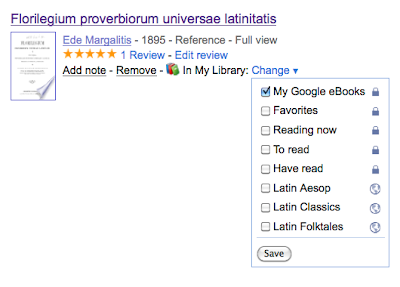 I am thrilled to see that GoogleBooks has made this all so easy. I will confess that I was really hit hard when GoogleBooks abruptly discontinued the use of labels a couple of years ago, and I started using Delicious to catalog my GoogleBooks instead. But now that I can configure my own bookshelves here, save books in multiple shelves, and mark the shelves as public or private, I will start maintaining an active set of Google Bookshelves, too, in addition to using Delicious.
If anybody else out there is going to maintain some Classics or Latin or Greek Google Bookshelves, share your links here with a comment at this blog post. I'm guessing we can all learn a lot from each other this way!
.
For those of you who are not aware of how this works, each user has a Google Library which you can choose to make public, or not, based on your unique user ID. For example, you can find the public area of my Google Library here:
http://books.google.com/books?uid=11474406259561102151
(Not sure how to find that address? Just go to Books.Google.com and click on the "My Library" link which you will find in the upper right-hand corner of the screen.)
Private and Public. You will see a list of all your bookshelves to the left. To toggle between public and private, just click on the bookshelf, choose Options, then Edit Properties, and you can mark a bookshelf as public or private. Some shelves, like Review, are inherently public and some, like Recently Read, are inherently private, but for most of the shelves you can choose what to make public or private.
 Create Shelves. Best of all, you can now "Create a New Bookshelf" by clicking the button at the bottom of the standard library bookshelf list! These bookshelves are directly addressable by their own URL. Here, for example, is the bookshelf where I will be adding Latin Proverb books. You can have books appear in multiple bookshelves, too, as shown in this screenshot (notice also that GoogleBooks reminds you there which shelves you have flagged as public and which are private):
 I am thrilled to see that GoogleBooks has made this all so easy. I will confess that I was really hit hard when GoogleBooks abruptly discontinued the use of labels a couple of years ago, and I started using Delicious to catalog my GoogleBooks instead. But now that I can configure my own bookshelves here, save books in multiple shelves, and mark the shelves as public or private, I will start maintaining an active set of Google Bookshelves, too, in addition to using Delicious.
If anybody else out there is going to maintain some Classics or Latin or Greek Google Bookshelves, share your links here with a comment at this blog post. I'm guessing we can all learn a lot from each other this way!
.
Subscribe to:
Posts (Atom)